Co ve skutečnosti znamená každý kód na vaší palubní vstupence
A boarding pass looks simple, but it is one of the most information-dense documents you will ever hold. Hidden among the airport codes and your name is a string of cryptic letters, numbers, and symbols that quietly control your entire journey: from which group you board with to whether you get pulled aside for an extra security check. Once you know how to read them, you will never look at a boarding pass the same way again.
The Anatomy of a Boarding Pass
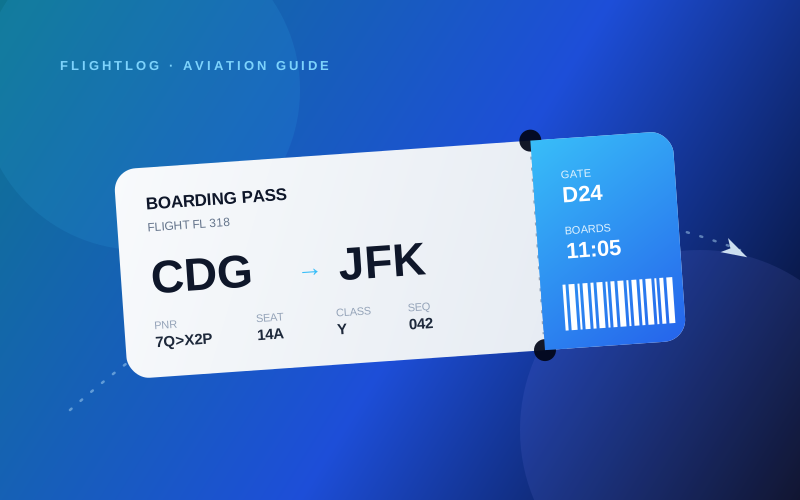
Every boarding pass, paper or digital, follows the same global standard set by IATA. At a glance you will always find your name, the route (two three-letter airport codes), the flight number, the date, the departure time, a gate, a seat, and a barcode. Around those obvious fields sit a handful of short codes that most travelers ignore. Those are the interesting ones.
The PNR: Your Booking's True Name
The PNR (Passenger Name Record), often labelled "Booking Reference" or "Confirmation Code", is a six-character code such as 7Q2X4P. It is the master key to your reservation. With it and your last name, anyone can look up, and sometimes modify, your booking, which is exactly why you should never post a photo of your boarding pass online. The barcode encodes the same data in machine-readable form.
Fare Class: The Single Letter That Says a Lot
That lonely letter next to your cabin (Y, J, F, W and dozens more) is your booking class, and it reveals far more than "economy" or "business". Airlines slice each cabin into a dozen fare buckets, each with its own price and rules. Y is full-fare economy; J is full-fare business; F is first. Deep-discount economy might be O, Q, or N. The letter determines how many frequent-flyer miles you earn, whether you can change your ticket, and your odds of an upgrade.
The Sequence Number
Printed as SEQ followed by a number like 042, the sequence number simply tells you the order in which passengers checked in: you were the 42nd person to check in for this flight. It is mostly used by gate staff, but a low sequence number can hint that the flight is filling up slowly, and it is occasionally used to decide who gets bumped on an oversold flight.
SSSS: The Four Letters You Don't Want
If you see SSSS printed on your pass, you have been selected for "Secondary Security Screening Selection". It means a more thorough check at the gate or security: a hand search, swabs, and questions. It is most common on flights to and from the United States and is usually random, though one-way tickets, last-minute bookings, and cash payments can raise the odds. TSA PRE, by contrast, is the code you do want: it grants expedited screening.
Zones, Groups, and Boarding Order
The GROUP or ZONE field (Group 1, Zone B, SkyPriority, and so on) sets the order in which you are invited to board. It is tied to your fare class and loyalty status, not to your seat. This is why two people sitting in the same row can board ten minutes apart, and why airlines guard their boarding order so carefully.
Gate, Boarding Time, and Departure Time
Two times appear on most passes and they are not the same. Boarding time is when the doors open, typically 30 to 45 minutes before departure. Departure time is the scheduled push-back from the gate, not wheels-up. The gate itself is the field most likely to change after printing, so always trust the airport screens over your pass for the gate number.
The Barcode: A Boarding Pass Inside Your Boarding Pass
That dense square or PDF417 stripe is the IATA "Bar Coded Boarding Pass" (BCBP). It packs everything (name, PNR, route, flight, seat, sequence number, and fare class) into a single scannable string, which is how a gate reader knows you instantly even with no internet connection. It is also exactly the data that a good app can read in a fraction of a second.
Let Your Phone Read It For You
Decoding all of this by hand is fun once. After that, you will want to automate it. FlightLog reads any boarding pass, the printed barcode or a digital pass on a screen, and instantly extracts the flight number, route, date, seat, and class into your personal flight journal. No typing, no errors, no account required. You can learn more in our step-by-step guide to scanning a boarding pass.
The next time you fly, take ten seconds to actually read your boarding pass, and then let FlightLog remember every detail for you. You can download FlightLog for free on iOS and Android and start logging flights in minutes.
Připraveni začít sledovat své lety?
Stáhněte si FlightLog zdarma a objevte všechny tyto funkce na svých vlastních letech.